Understanding Git Workflow: A Beginner's Guide to Version Control
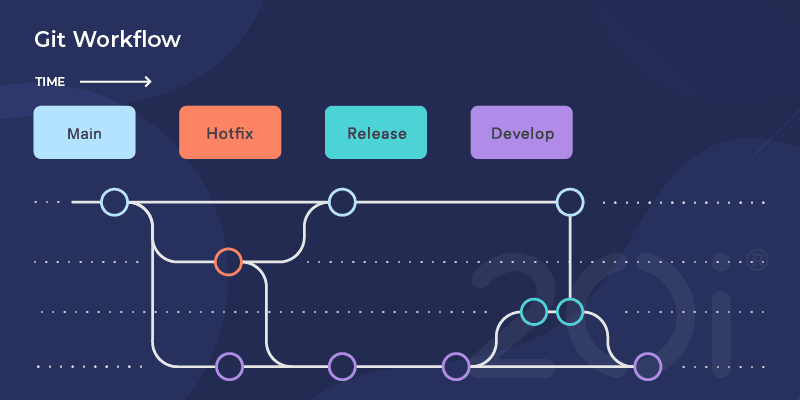
A practical introduction to Git workflow for beginner developers. Learn the basics of version control, branching strategies, commit best practices, and how to collaborate with your team using Git. This guide covers essential commands, common workflows like feature branches and pull requests, how to handle merge conflicts, and tips for keeping your repository clean and organized. Perfect for junior developers looking to understand Git beyond basic commands and start contributing to team projects confidently.
Understanding Git Workflow: A Beginner's Guide to Version Control
When I started coding, Git was confusing. I'd see commands like rebase, cherry-pick, and stash, and honestly, I had no idea what they meant. I was scared to mess things up. But once I understood the basic workflow, Git became one of my favorite tools. It's like having a time machine for your code!
In this guide, I'll share what I wish someone had told me when I was learning Git. We'll focus on practical workflows you'll actually use, not every single Git command that exists.
Why Git Workflow Matters
Before diving into commands, let's talk about why having a workflow is important. Imagine you're working on a project with your team. Without a system:
- People overwrite each other's code
- It's hard to track who changed what
- Rolling back broken features is a nightmare
- Multiple people can't work on the same feature easily
A Git workflow solves these problems. It's basically a set of rules about how you use Git in your team. Think of it like traffic rules—everyone follows the same pattern, so things don't crash.
The Basic Git Commands You Need
Let me quickly cover the essential commands. If you're already comfortable with these, feel free to skip ahead.
Starting a repository:
git init                    # Create a new repo
git clone <url>            # Copy an existing repo
Daily workflow:
git status                 # See what's changed
git add .                  # Stage all changes
git commit -m "message"    # Save your changes
git push                   # Upload to remote
git pull                   # Download latest changes
Branching:
git branch                 # List branches
git branch <name>          # Create new branch
git checkout <name>        # Switch to branch
git checkout -b <name>     # Create and switch
That's honestly 90% of what you'll use day-to-day. The rest builds on these foundations.
The Feature Branch Workflow
This is the most common workflow you'll encounter, especially at startups and smaller teams. Here's how it works:
- The
mainbranch always has working code - Create a new branch for each feature
- Work on your feature in that branch
- When done, merge it back to
main
Step-by-Step Example
Let's say you're adding a login feature. Here's how it looks:
# Make sure you're on main and it's up to date
git checkout main
git pull origin main

# Create a new branch for your feature
git checkout -b feature/login

# Make your changes, then commit
git add .
git commit -m "Add login form UI"

# Make more changes
git add .
git commit -m "Add login API integration"

# Push your branch to GitHub/GitLab
git push origin feature/login
At this point, you'd create a pull request (or merge request) on GitHub. Your team reviews your code, suggests changes, and eventually approves it. Then you merge it into main.
Why This Works
Feature branches keep your work isolated. If you break something, it's only broken in your branch, not in the main codebase. Your teammates can keep working without any issues.
Writing Good Commit Messages
I used to write commit messages like "fixed stuff" or "updates". Don't do this! Future you (and your teammates) will be frustrated trying to understand what changed.
Here's what I learned:
Bad commit messages:
- "fixed bug"
- "updates"
- "changes"
- "asdfasdf"
Good commit messages:
- "Fix login button not responding on mobile"
- "Add user authentication with JWT"
- "Update homepage layout to match new design"
A good commit message answers: "What does this commit do?"
I use this simple format:
[Type] Short description

Longer explanation if needed

- Detail 1
- Detail 2
Types I use:
feat: New featurefix: Bug fixdocs: Documentation changesrefactor: Code cleanuptest: Adding tests
Example:
git commit -m "feat: Add password reset functionality

Users can now reset their password via email.
Sends a reset link that expires in 1 hour.

- Add reset password form
- Implement email service
- Add password reset endpoint"
Handling Merge Conflicts (Don't Panic!)
Merge conflicts scared me at first. They happen when two people edit the same part of a file. Git doesn't know which version to keep, so it asks you to decide.
Here's what a conflict looks like:
function greet() {
<<<<<<< HEAD
  return "Hello!";
=======
  return "Hi there!";
>>>>>>> feature/new-greeting
}
The part between <<<<<<< HEAD and ======= is your current branch's version. The part between ======= and >>>>>>> feature/new-greeting is the incoming changes.
To resolve it:
- Decide which version to keep (or combine them)
- Delete the conflict markers (
<<<<<<<,=======,>>>>>>>) - Save the file
- Stage and commit
# After fixing the conflict
git add .
git commit -m "Resolve greeting conflict"
Pro tip: Don't try to resolve conflicts during a merge or rebase. Take your time, test your changes, and make sure everything works.
Keeping Your Branch Updated
When you work on a feature for a few days, the main branch keeps moving forward. Other people are merging their features. Your branch gets "outdated".
Here's how to keep it updated:
# Switch to main and get latest changes
git checkout main
git pull origin main

# Switch back to your feature branch
git checkout feature/login

# Merge main into your branch
git merge main
Or, if you prefer a cleaner history (more advanced):
git checkout feature/login
git rebase main
I usually stick with merge as a beginner. It's safer and more straightforward.
The Pull Request Process
Pull requests (PRs) are how you get your code reviewed before merging. Here's my typical PR workflow:
-
Push your branch
git push origin feature/login -
Create PR on GitHub
- Go to your repository
- Click "New Pull Request"
- Select your branch
- Add a description of what you changed
-
Address feedback
- Teammates review your code
- They suggest changes
- You make updates and push again
git add . git commit -m "Address review feedback" git push origin feature/login -
Merge when approved
- Someone approves your PR
- You click "Merge"
- Delete the feature branch (GitHub usually prompts you)
Common Git Commands I Use Daily
Here are commands I actually use regularly:
Check what changed:
git status              # What files changed?
git diff                # What exactly changed?
git log                 # History of commits
git log --oneline       # Compact history
Undo mistakes:
git checkout -- <file>  # Discard changes to a file
git reset HEAD <file>   # Unstage a file
git reset --soft HEAD~1 # Undo last commit, keep changes
Stash work in progress:
git stash              # Save changes temporarily
git stash pop          # Get them back
I use stash when I need to switch branches but I'm not ready to commit yet.
Tips That Helped Me
1. Commit often, push regularly
Don't wait until Friday to commit all week's work. Commit every time you complete a small task. Push at least once a day.
2. Pull before you push
Always git pull before git push. This prevents conflicts and keeps you updated.
git pull origin main
git push origin feature/login
3. One feature, one branch
Don't work on multiple features in one branch. If you need to work on something else, create a new branch.
4. Never commit directly to main
Seriously. Always use a feature branch, even for small changes. This keeps main stable.
5. Read error messages
Git's error messages are actually helpful! They usually tell you exactly what to do. Take a moment to read them.
A Simple Daily Workflow
Here's what my typical day looks like:
Morning:
git checkout main
git pull origin main
git checkout -b feature/new-task
Throughout the day:
# After completing a small task
git add .
git commit -m "feat: Add user profile page"

# Every couple hours
git push origin feature/new-task
End of day:
git add .
git commit -m "feat: Complete user profile functionality"
git push origin feature/new-task
Then I create a pull request and ask for review.
What About GitHub Flow?
You might hear about "GitHub Flow". It's basically what I described above:
mainbranch is always deployable- Create feature branches from
main - Commit regularly
- Open a pull request
- Review and discuss
- Merge when approved
- Deploy
It's simple and works great for web development. Start with this before learning more complex workflows.
When Things Go Wrong
We all mess up. Here are quick fixes for common problems:
Committed to the wrong branch:
git reset --soft HEAD~1  # Undo commit, keep changes
git stash                # Save changes
git checkout correct-branch
git stash pop            # Apply changes
Need to undo a commit:
git revert <commit-hash> # Creates a new commit that undoes changes
Accidentally deleted something:
git reflog               # Find the commit
git checkout <hash>      # Recovery!
Learning Resources
When I was learning Git, these helped me:
- GitHub's Git Handbook - Great visual explanations
- Learn Git Branching - Interactive tutorial (learngitbranching.js.org)
- Oh Shit, Git!?! - How to fix common mistakes (ohshitgit.com)
Final Thoughts
Git workflow isn't about memorizing every command. It's about understanding the pattern:
- Branch off main
- Make changes
- Commit regularly
- Push your branch
- Create pull request
- Get reviewed
- Merge
Start simple. You don't need to know advanced commands like cherry-pick or rebase right away. Master the basics first.
The best way to learn is by doing. Make mistakes in your personal projects. Try things out. Git is very hard to break permanently—there's almost always a way to undo or recover.
And remember: everyone was confused by Git at first. Every senior developer you admire probably pushed to the wrong branch or had merge conflicts they didn't know how to fix. It gets easier with practice.
Happy coding, and may your merges be conflict-free!